Live Casters
Watch players explore, quest, hunt, and war in real-time through the in-game Live Cast system.
Live Streams
0
Total Viewers
0
Public Streams
0
Password Protected
0
No active live streams right now
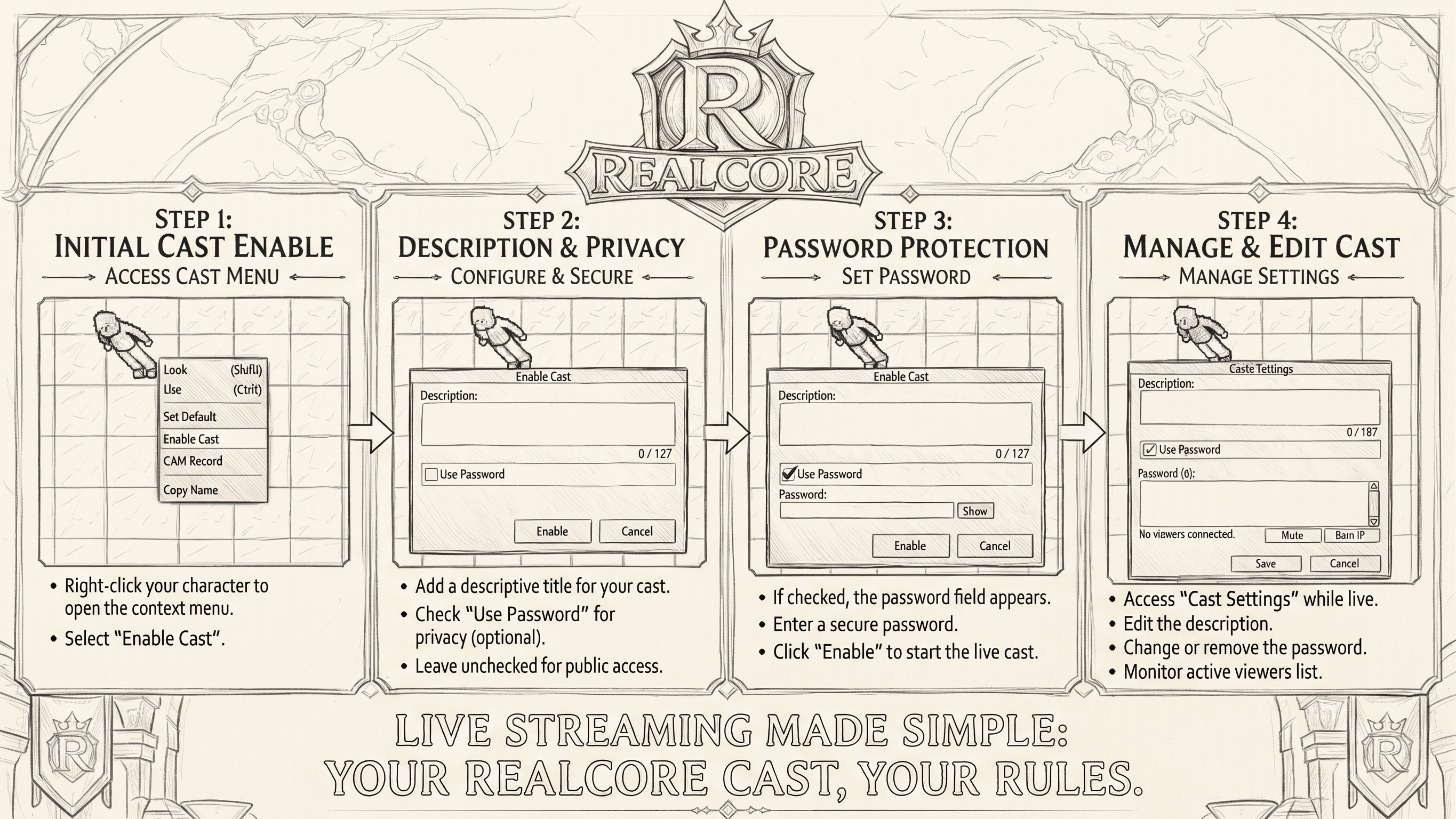
No players are broadcasting currently. Log in-game and right-click your character and pick "Enable Cast" to start streaming your adventures to the community!
Most watched this week
Ranked by watch time (spectators × time), last 7 days-
1
Pacco
Level 157 · Vocation: Paladin · World: Genesis
- Watched
- < 1m
- Peak
- 0 viewers
- Time live
- < 1m
- Casts
- 2

How to Watch a Live Stream
Open the Realcore client and click Streamings. Choose the cast you want to watch, pick the viewer name you will appear as, and enter to start watching.
How to Broadcast Your Gameplay:
Right-click your character in the game client and choose Enable Cast. The four steps below cover going live, naming your broadcast, protecting it with a password, and managing it while it runs.